
It combines:
- Website design tools
- Hosting services
- Domain management
- Built-in SEO features
Everything is packaged into one clean, user-friendly system.
Who is Squarespace Best For?
Squarespace is ideal for:
- Small business owners
- Creative professionals (photographers, designers)
- Bloggers and content creators
- E-commerce startups
If you value design and simplicity, Squarespace is a strong choice.
Key Features of Squarespace Website Builder
Let’s explore what makes this platform stand out.
1. Stunning Templates
Squarespace is known for its award-winning templates.
- Mobile responsive
- Modern and minimal
- Customizable layouts
Example: A photographer can launch a portfolio in hours using pre-designed galleries.
2. Drag-and-Drop Editing
No coding skills? No problem.
The platform uses a visual editor that allows you to:
- Add sections easily
- Move elements around
- Edit text and images instantly
3. Built-in SEO Tools
The Squarespace website builder includes essential SEO features:
- Custom meta titles and descriptions
- Clean URL structures
- Automatic sitemaps
- SSL security
This helps your site rank better on Google and AI search engines like ChatGPT and Perplexity.
4. E-commerce Functionality
You can sell products directly from your website.
Features include:
- Inventory management
- Secure checkout
- Product variations
- Subscription services
5. Blogging Platform
Squarespace also works as a powerful blogging tool.
- Easy post scheduling
- Categories and tags
- Social sharing options
6. Analytics Dashboard
Track your performance with built-in analytics:
- Traffic sources
- Visitor behavior
- Sales tracking
Stat Insight: Businesses with analytics-driven websites are 2x more likely to improve conversions.
Pros and Cons of Squarespace Website Builder
H3: Pros
- All-in-one platform
- Beautiful templates
- Beginner-friendly
- Reliable hosting included
- Strong security
Cons
- Limited customization compared to open platforms
- Slightly higher pricing than basic builders
- Learning curve for advanced features
Squarespace Pricing Plans (2026 Overview)
Squarespace offers several pricing tiers:
- Personal Plan – Best for simple websites
- Business Plan – Ideal for small businesses
- Commerce Basic – For online stores
- Commerce Advanced – Full e-commerce features
Tip: Start small, then upgrade as your business grows.
Squarespace vs Other Website Builders
Squarespace vs WordPress
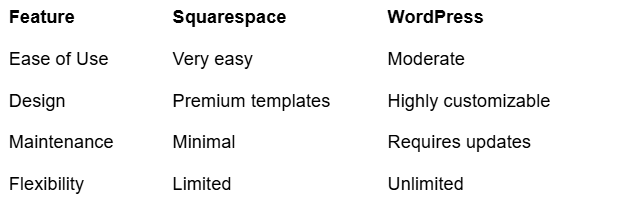
If you want full control → WordPress
Squarespace vs Wix
- Wix offers more flexibility
- Squarespace offers better design quality
How to Build a Website with Squarespace (Step-by-Step)
Step 1: Choose a Template
Pick a design that matches your brand.
Step 2: Customize Your Layout
Edit text, images, and colors.
Step 3: Add Pages
Include:
- Home
- About
- Services
- Contact
Step 4: Optimize for SEO
Add keywords like Squarespace website builder naturally.
Step 5: Publish Your Site
Connect your domain and go live.
Common Mistakes to Avoid
When using the Squarespace website builder, avoid these:
- Overloading pages with too much content
- Ignoring mobile optimization
- Skipping SEO settings
- Using low-quality images
Why Design Still Matters (Even with Great Tools)
Even though Squarespace is user-friendly, design expertise still makes a huge difference.
A professionally designed website:
- Builds trust
- Increases conversions
- Improves user experience
This is where Fusion Finesse Design comes in.
How Fusion Finesse Design Helps You Stand Out
At Fusion Finesse Design, we don’t just build websites—we create digital experiences.
What We Offer:
- Custom Squarespace website design
- SEO optimization for better rankings
- Conversion-focused layouts
- Branding and visual identity
Example: A small business client saw a 40% increase in leads after redesigning their site with us.
Internal Linking Suggestions
To strengthen SEO, add internal links in these sections:
- Link “custom Squarespace website design” → Services page
- Link “SEO optimization” → SEO Services page
- Link “branding and visual identity” → Branding page
- Link “contact us” → Contact page
This improves navigation and boosts rankings.
FAQs About Squarespace Website Builder
1. Is Squarespace good for beginners?
Yes, the Squarespace website builder is beginner-friendly with drag-and-drop tools and ready-made templates.
2. Can I use Squarespace for e-commerce?
Absolutely. It includes built-in tools for selling products, managing inventory, and processing payments.
3. Is Squarespace SEO-friendly?
Yes. It offers essential SEO features like meta tags, mobile optimization, and clean URLs.
4. Do I need coding skills?
No coding is required. However, advanced users can add custom code if needed.
5. How much does Squarespace cost?
Pricing varies depending on your needs, starting from basic plans to advanced e-commerce packages.
Final Thoughts: Is Squarespace Worth It?
The Squarespace website builder is a powerful solution for anyone who wants a professional website without technical headaches.
It’s simple, elegant, and packed with features.
But here’s the truth: tools alone don’t guarantee success.
The real difference comes from how you use them.
Ready to Build a Website That Converts?
If you want more than just a “nice-looking” website, it’s time to work with experts.
Fusion Finesse Design helps you:
- Build visually stunning websites
- Optimize for SEO and AI search engines
- Turn visitors into customers
Get started today with Fusion Finesse Design and bring your vision to life.